Using adifmt with nushell
Table of Contents
Recently I’ve started using nushell for shell scripting. Nushell is an interesting shell because it supports structured data in the form of lists, records, and tables.
A list is like a JSON array [1, 2, 3]
A record is like a JSON object {name: "Eric", callsign: "K3FNB"}
A table is like a CSV file or a SQL table. It has rows and columns. For instance, the typical ls command in Linux produces a table that can be filtered and transformed.
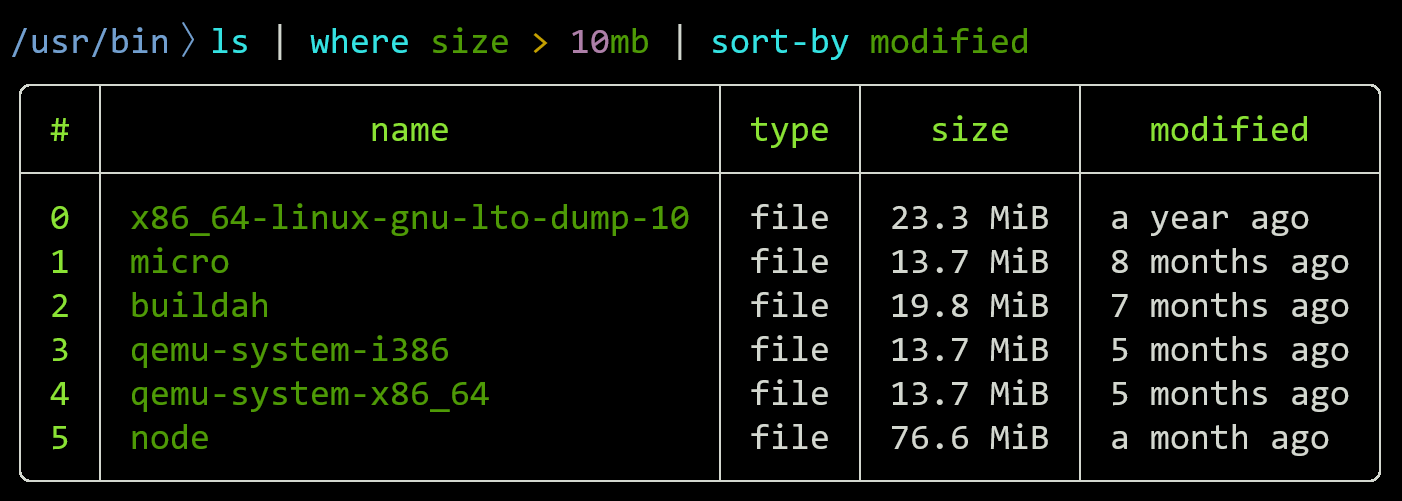
Nu also has native support for Dates, Durations i.e. "1day", File Sizes, and more.
You can naturally express things like (date now) - 52wk to find a date a year ago.
#
Processing Ham Logs
Nu also has native support for JSON. This means I can use adif-multitool to work with my log files.
Lets say I have this WSJTX log and I want to view the QSOs as a table.
nu❯ cat ~/.local/share/WSJT-X/wsjtx_log.adi
ADIF Export
<adif_ver:5>3.1.1
<created_timestamp:15>20260709 192333
<programid:6>WSJT-X
<programversion:5>3.0.1
<eoh>
<call:6>KD0JXE <gridsquare:4>EN34 <mode:3>FT8 <rst_sent:3>-12 <rst_rcvd:3>-08 <qso_date:8>20260709 <time_on:6>192230 <qso_date_off:8>20260709 <time_off:6>192330 <band:3>20m <freq:9>14.075550 <station_callsign:5>K3FNB <my_gridsquare:6>FM19JE <eor>
<call:5>WA9TT <gridsquare:4>EN54 <mode:3>FT8 <rst_sent:3>-13 <rst_rcvd:3>-07 <qso_date:8>20260709 <time_on:6>193815 <qso_date_off:8>20260709 <time_off:6>193915 <band:3>20m <freq:9>14.075550 <station_callsign:5>K3FNB <my_gridsquare:6>FM19JE <eor>
<call:5>K2TAV <gridsquare:4>FN33 <mode:3>FT8 <rst_sent:3>-12 <rst_rcvd:3>+00 <qso_date:8>20260711 <time_on:6>182600 <qso_date_off:8>20260711 <time_off:6>182700 <band:3>20m <freq:9>14.075750 <station_callsign:5>K3FNB <my_gridsquare:6>FM19JE <eor>
<call:5>K4CAE <gridsquare:4>EM94 <mode:3>FT8 <rst_sent:3>+08 <rst_rcvd:3>-08 <qso_date:8>20260711 <time_on:6>183530 <qso_date_off:8>20260711 <time_off:6>183630 <band:3>20m <freq:9>14.075750 <station_callsign:5>K3FNB <my_gridsquare:6>FM19JE <eor>
<call:5>WA9TT <gridsquare:4>EN54 <mode:3>FT8 <rst_sent:3>-11 <rst_rcvd:3>-15 <qso_date:8>20260711 <time_on:6>184045 <qso_date_off:8>20260711 <time_off:6>184245 <band:3>20m <freq:9>14.075750 <station_callsign:5>K3FNB <my_gridsquare:6>FM19JE <eor>
<call:4>KB6V <gridsquare:4>EM16 <mode:3>FT8 <rst_sent:3>-06 <rst_rcvd:3>+05 <qso_date:8>20260711 <time_on:6>185915 <qso_date_off:8>20260711 <time_off:6>190015 <band:3>20m <freq:9>14.075750 <station_callsign:5>K3FNB <my_gridsquare:6>FM19JE <eor>
<call:6>WB5OTR <gridsquare:4>EM25 <mode:3>FT8 <rst_sent:3>-06 <rst_rcvd:3>+02 <qso_date:8>20260711 <time_on:6>215815 <qso_date_off:8>20260711 <time_off:6>215915 <band:3>20m <freq:9>14.075200 <station_callsign:5>K3FNB <my_gridsquare:6>FM19JE <eor>
Using adifmt cat --output json we can turn this file into JSON.
{
 "HEADER": {
  "ADIF_VER": "3.1.5",
  "CREATED_TIMESTAMP": "20260711 194520",
  "PROGRAMID": "adifmt",
  "PROGRAMVERSION": "(devel)"
 },
 "RECORDS": [
  {
   "BAND": "20m",
   "CALL": "KD0JXE",
   "FREQ": "14.075550",
   "GRIDSQUARE": "EN34",
   "MODE": "FT8",
   "MY_GRIDSQUARE": "FM19JE",
   "QSO_DATE": "20260709",
   "QSO_DATE_OFF": "20260709",
   "RST_RCVD": "-08",
   "RST_SENT": "-12",
   "STATION_CALLSIGN": "K3FNB",
   "TIME_OFF": "192330",
   "TIME_ON": "192230"
  },
  ... omitted ...
 ]
}
This JSON can then be parsed as a Nu record using the from json command
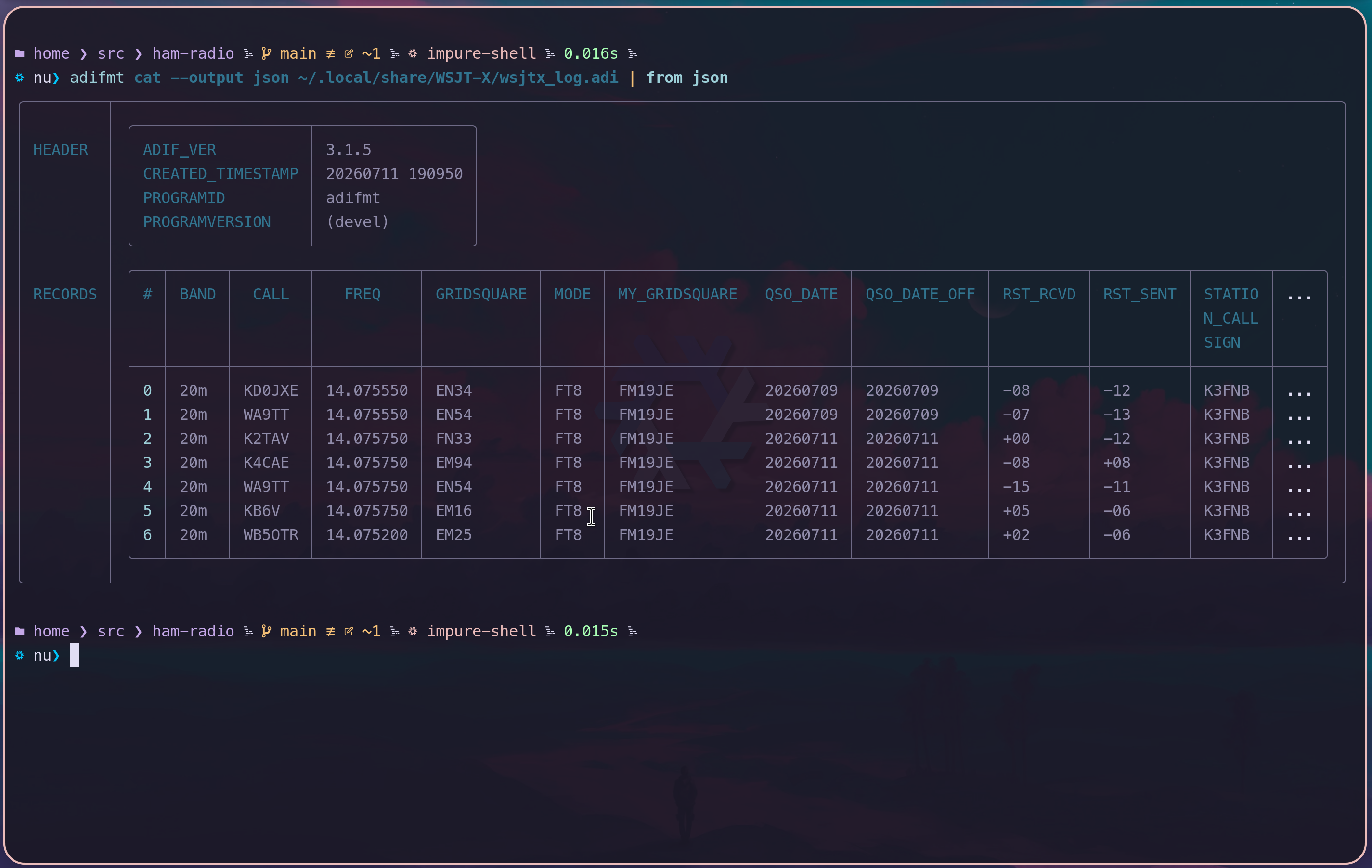
Once we have the data in native Nu data structures we can do all kinds of manipulations.
For instance, when I am in the park, I can watch the log using the following snippet. This way I can know when I have activated the park by collecting 10 contacts.
loop {
  clear
  adifmt cat --output json ~/.local/share/WSJT-X/wsjtx_log.adi
    | from json
    | get RECORDS
    | print
  sleep 5sec
}
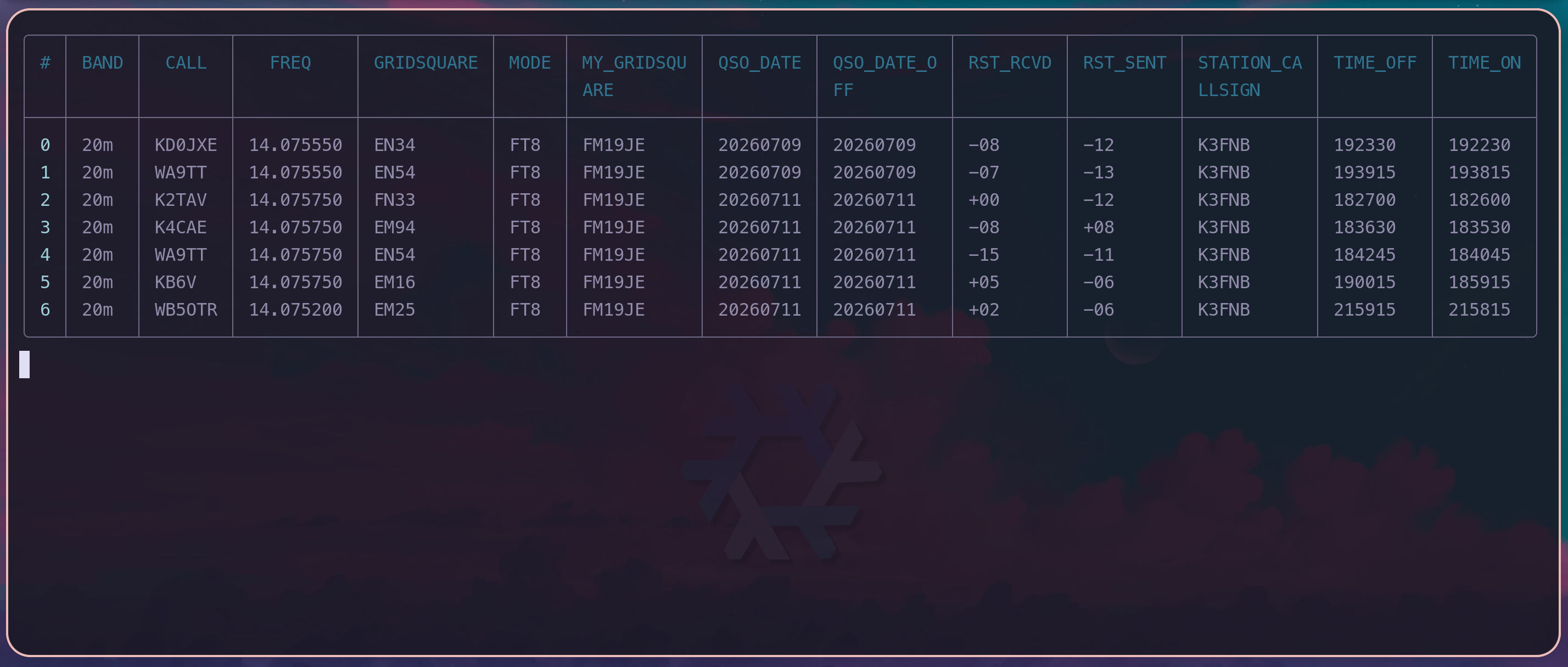
Oh no, that includes QSOs from two days ago, I need to filter those. That’s easy to do with the where command.
loop {
   clear
   adifmt cat --output json ~/.local/share/WSJT-X/wsjtx_log.adi
     | from json
     | get RECORDS
+     | where QSO_DATE >= "20260711"
     | print
   sleep 5sec
 }
If you know SQL, this is looking familiar.
Ok, let’s say I’m done with the activation and I need to submit the log to https://pota.app/ and upload it to my Cloudlog instance.
The WSJT-X log doesn’t have the park reference in it. This means that when I upload it to Cloudlog, it won’t know which park I activated.
According to the POTA docs,, I need to add a field called MY_SIG_INFO to the log so that my logging software will know which park I was in.
Let’s use Nu to add that the log.
adifmt cat --output json ~/.local/share/WSJT-X/wsjtx_log.adi
  | from json                            # Convert the adif JSON to a Nu record
  | update RECORDS {                     # Update the log's RECORD field
      where QSO_DATE >= "20260711"       # Only select today's QSOs
      | insert MY_SIG_INFO { "US-1596" } # Set MY_SIG_INFO to US-1596 to each QSO
    }
  | to json                              # Convert the Nu record back into JSON
  | adifmt cat                           # Convert the JSON into adif data
Generated at Sat, 11 Jul 2026 19:51:27 -0400 with 5 records by https://github.com/flwyd/adif-multitool
<ADIF_VER:5>3.1.5 <CREATED_TIMESTAMP:15>20260711 195127 <PROGRAMID:6>adifmt <PROGRAMVERSION:7>(devel) <EOH>
<QSO_DATE_OFF:8>20260711 <RST_RCVD:3>+00 <BAND:3>20m <RST_SENT:3>-12 <STATION_CALLSIGN:5>K3FNB <TIME_OFF:6>182700 <TIME_ON:6>182600 <MY_SIG_INFO:7>US-1596 <CALL:5>K2TAV <FREQ:9>14.075750 <GRIDSQUARE:4>FN33 <MODE:3>FT8 <MY_GRIDSQUARE:6>FM19JE <QSO_DATE:8>20260711 <EOR>
<MODE:3>FT8 <MY_GRIDSQUARE:6>FM19JE <RST_RCVD:3>-08 <TIME_OFF:6>183630 <GRIDSQUARE:4>EM94 <QSO_DATE:8>20260711 <QSO_DATE_OFF:8>20260711 <RST_SENT:3>+08 <STATION_CALLSIGN:5>K3FNB <TIME_ON:6>183530 <MY_SIG_INFO:7>US-1596 <BAND:3>20m <CALL:5>K4CAE <FREQ:9>14.075750 <EOR>
<MY_GRIDSQUARE:6>FM19JE <QSO_DATE:8>20260711 <QSO_DATE_OFF:8>20260711 <RST_RCVD:3>-15 <RST_SENT:3>-11 <GRIDSQUARE:4>EN54 <MODE:3>FT8 <STATION_CALLSIGN:5>K3FNB <TIME_OFF:6>184245 <TIME_ON:6>184045 <MY_SIG_INFO:7>US-1596 <BAND:3>20m <CALL:5>WA9TT <FREQ:9>14.075750 <EOR>
<TIME_OFF:6>190015 <TIME_ON:6>185915 <MY_SIG_INFO:7>US-1596 <BAND:3>20m <FREQ:9>14.075750 <GRIDSQUARE:4>EM16 <MODE:3>FT8 <MY_GRIDSQUARE:6>FM19JE <QSO_DATE:8>20260711 <RST_RCVD:3>+05 <STATION_CALLSIGN:5>K3FNB <CALL:4>KB6V <QSO_DATE_OFF:8>20260711 <RST_SENT:3>-06 <EOR>
<QSO_DATE:8>20260711 <QSO_DATE_OFF:8>20260711 <RST_RCVD:3>+02 <TIME_ON:6>215815 <MY_SIG_INFO:7>US-1596 <BAND:3>20m <FREQ:9>14.075200 <GRIDSQUARE:4>EM25 <MODE:3>FT8 <MY_GRIDSQUARE:6>FM19JE <RST_SENT:3>-06 <STATION_CALLSIGN:5>K3FNB <TIME_OFF:6>215915 <CALL:6>WB5OTR <EOR>
If I remove the adifmt cat line, the command will spit out the JSON which is a bit easier to read.
{
  "HEADER": {
    "ADIF_VER": "3.1.5",
    "CREATED_TIMESTAMP": "20260711 195319",
    "PROGRAMID": "adifmt",
    "PROGRAMVERSION": "(devel)"
  },
  "RECORDS": [
    {
      "BAND": "20m",
      "CALL": "K2TAV",
      "FREQ": "14.075750",
      "GRIDSQUARE": "FN33",
      "MODE": "FT8",
      "MY_GRIDSQUARE": "FM19JE",
      "QSO_DATE": "20260711",
      "QSO_DATE_OFF": "20260711",
      "RST_RCVD": "+00",
      "RST_SENT": "-12",
      "STATION_CALLSIGN": "K3FNB",
      "TIME_OFF": "182700",
      "TIME_ON": "182600",
      "MY_SIG_INFO": "US-1596"
    },
	... omitted ...
  ]
}
There’s the MY_SIG_INFO field in there!
Now if you’ve ever used adifmt before to manipulate your log you’re probably screaming, “You can do this with adifmt edit!!!”. That is very true, and it is honestly much easier to use.
adifmt edit --if qso_date>=20260711 --add MY_SIG_INFO=US-1596 ~/.local/share/WSJT-X/wsjtx_log.adi
Even though this is very concise, I’d argue that knowing Nu gives you a more universal way to manipulate data.
If you find yourself using tools like python, jq, yq, adifmt, etc. to programmatically manipulate data, you might want to take a look at Nushell. Each of those aforementioned tools all have their own ways of updating data, and you have to remember each tool’s way of doing things.
For instance, I couldn’t remember how to make adifmt do the above, so I had to run adifmt edit --help and read the docs.
If I know the Nu patterns to update its records and tables, I don’t have to remember how adifmt adds a field to a log. I can use the Nu insert command. I can use the insert command for any table. It doesn’t matter if that table was JSON, YAML, sqlite, whatever. Anything I can turn into a table, I know how to add a column to it.
In another example, adding MY_SIG_INFO using jq would be the following:
adifmt cat --output json ~/.local/share/WSJT-X/wsjtx_log.adi | jq '.RECORDS[].MY_SIG_INFO = "US-1596"' | adifmt cat
Ok, that is pretty concise, however, jq’s query strings get unwieldy quickly as they grow in complexity.
I find Nushell to be much easier to use if the task grows complex enough. In addition, combining bash and jq to script data pipelines becomes a mess. bash just isn’t a great programming language, but pipelines are nice, so we use it. Nushell gives us a better way to do pipelines.
#
A complex example
I’ll show you a very complex example to show off the power of Nushell. Let’s use Nu to explore POTA.app’s unofficial API to plan some activations.
We can use the http get command to fetch all the parks in Maryland
http get https://api.pota.app/location/parks/US-MD
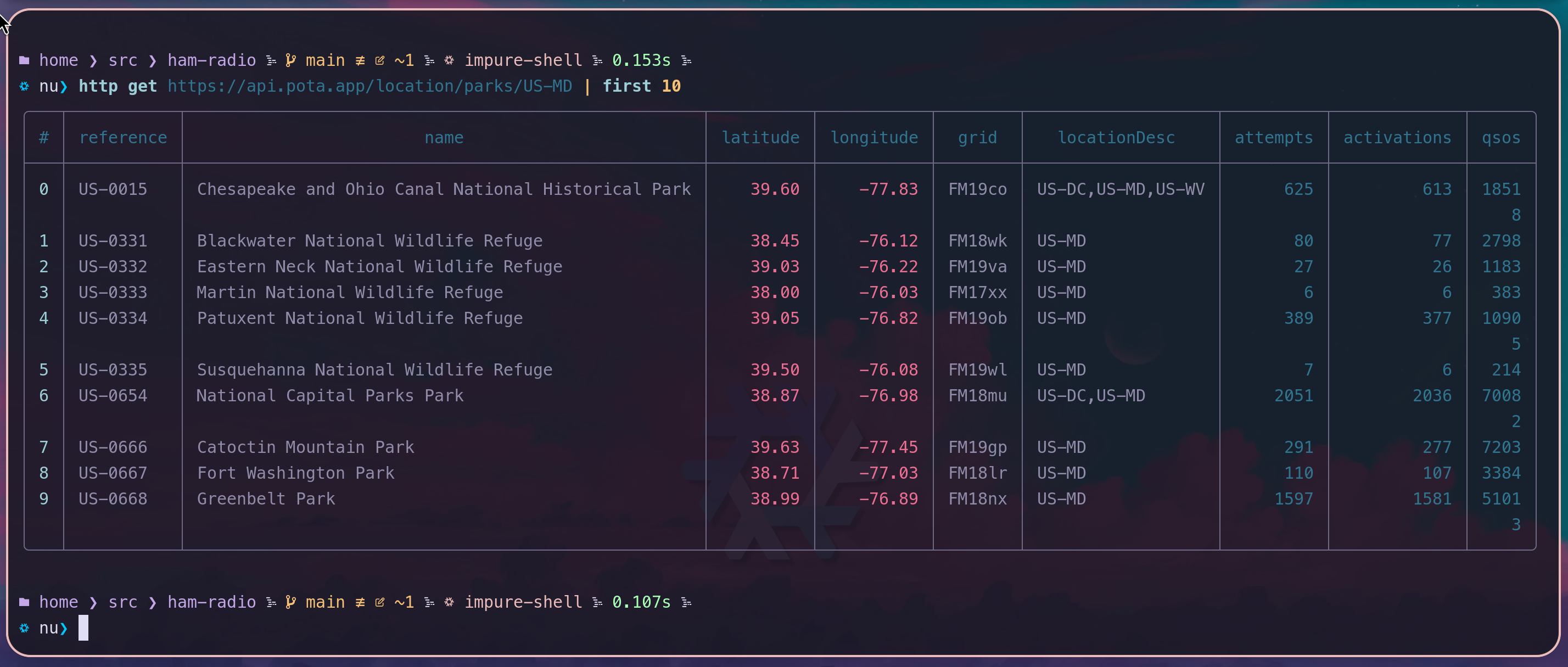
Now, what if I want to know which parks have the fewest activations? That is easy with the sort-by command.
http get https://api.pota.app/location/parks/US-MD | sort-by activations | first 10
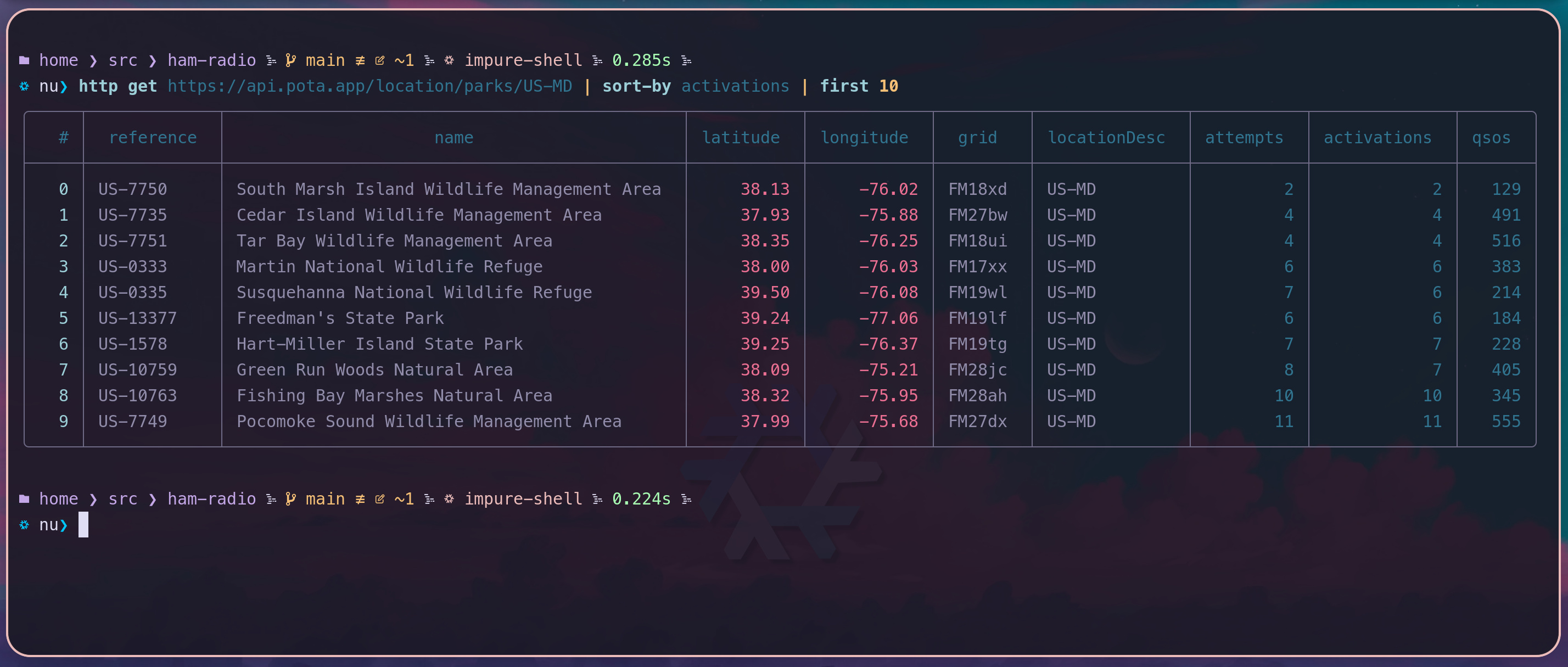
That’s cool but the parks/US-MD data is a summary. What if I want more info about the parks? I can pipe the result into par-each to fetch the /park/{reference} JSON in parallel to get more details about a park. (Here’s US-1596)
# Fetch all the parks in Maryland
http get https://api.pota.app/location/parks/US-MD
  # Get 10 with the fewest activations
  | sort-by activations | first 10
  # In Parallel do the following
  | par-each { |park|
      # Fetch the detailed view of the park
      # i.e. https://api.pota.app/park/US-1596
      http get $"https://api.pota.app/park/($park.reference)"
        # The detailed data is missing activations. Copy it from the input
        | insert activations $park.activations
        # Select some of the columns
        | select reference name activations parkComments website
    }
  # Convert the table to Markdown
  | to md
| reference | name | activations | parkComments | website |
|---|---|---|---|---|
| US-7751 | Tar Bay | 4 | https://dnr.maryland.gov/wildlife/pages/publiclands/eastern/tarbay.aspx | |
| US-1578 | Hart-Miller Island | 7 | Accessible by personal boat only | https://dnr.maryland.gov/publiclands/pages/central/hartmiller.aspx |
| US-13377 | Freedman’s | 6 | New park carved out of US-1589 Patuxent River State Park. Not a 2fer. | https://dnr.maryland.gov/publiclands/Pages/central/Freedmans.aspx |
| US-10763 | Fishing Bay Marshes | 10 | There are three boat launch areas with small parking lots at each site. Otherwise, there are no established hiking trails or boardwalks, restroom facilities or paved parking areas. | https://dnr.maryland.gov/wildlife/Pages/NaturalAreas/Eastern/Fishing-Bay-Marshes.aspx |
| US-0333 | Martin | 6 | Though these refuge lands are closed to the public to protect wetland habitats and limit disturbance to wildlife, much of the refuge can be seen by boat. | https://www.fws.gov/refuge/martin |
| US-7735 | Cedar Island | 4 | Island only accessible by boat | https://dnr.maryland.gov/wildlife/pages/publiclands/eastern/cedarisland.aspx |
| US-0335 | Susquehanna | 6 | Refuge is closed to the public for land-based visits, but the waterline is the boundary. Research exact boundaries VERY VERY carefully before attempting a maritime activation. | https://www.fws.gov/refuge/susquehanna |
| US-7750 | South Marsh Island | 2 | Access is only by boat. | https://dnr.maryland.gov/wildlife/pages/publiclands/eastern/southmarsh.aspx |
| US-10759 | Green Run Woods | 7 | Natural Area is in a remote section of the Island that requires either an 8-mile (one way) walk from the last parking lot, or a 4-wheel drive vehicle and an Over-Sand Vehicle (OSV) permit from the NPS. Beach is closed during high tides. | https://dnr.maryland.gov/wildlife/Pages/NaturalAreas/Eastern/Green-Run-Woods.aspx |
| US-7749 | Pocomoke Sound | 11 | No motorized vehicles allowed. Accessible by boat only. | https://dnr.maryland.gov/wildlife/Pages/publiclands/eastern/pocomokesound.aspx |
Let’s get wild. Let’s define a function to calculate the distance between two points in kilometers. I will use a formula called haversine that calculates the distance in kilometers between two lat/long points. (You can copy and paste this into a Nushell)
use std/math

def "math radians" []: nothing -> float {
  $in * $math.PI / 180
}

# Calculate the distance in kilometers between two [lat long] pairs
# Translated from the Python found here: <https://stackoverflow.com/a/4913653>
def haversine [p1 p2] {
    let p1 = $p1 | each { math radians }
    let p2 = $p2 | each { math radians }
    let dlat = $p2.0 - $p1.0
    let dlon = $p2.1 - $p1.1

    let a = ($dlat / 2 | math sin | $in ** 2) + ($p1.0 | math cos) * ($p2.0 | math cos) * ($dlon / 2 | math sin | $in ** 2)
    let c = 2 * ($a | math sqrt | math arcsin)
    let r = 6371.8 # Radius of earth in kilometers
    $c * $r
}
Now we can find the 10 closest parks to me
let my_location = [39.1594134787215, -77.1592967000434]
http get https://api.pota.app/location/parks/US-MD
 # Add the distance from my location
 | insert distance { |park| haversine [$park.latitude, $park.longitude] $my_location}
 # Sort by distance from me
 | sort-by distance
 # Take the first 10 from the result
 | first 10
 # In parallel fetch each park's details
 | par-each { |park|
      # Fetch the detailed view of the park
      # i.e. https://api.pota.app/park/US-1596
      http get $"https://api.pota.app/park/($park.reference)"
        # The detailed data is missing activations. Copy it from the input
        | insert activations $park.activations
        # Put the park's distance into the detailed version
        | insert distance $park.distance
        # Select some of the columns
        | select reference name distance activations parkComments website
    }
# sort by distance again because par-each orders the row by when they finish
| sort-by distance
# format the distance
| update distance { $in | math round --precision 2 | $"($in)km" }
# Convert the table to Markdown
| to md
Oh look, there’s a new park, US-13377 that is close by. I wasn’t aware of that. Its first activation was June 6th, 2026. I gotta get out there and activate that one!
#
Conclusion
This might be deeply nerdy, but I hope you can see the power of this over scripting in bash. I avoided Nushell for a while because bash is so ubiquitous, but I’ve become a convert. If you do any kind of data manipulation for fun or for pay, you really should check out Nushell.